Week 10: Build Your Own -- Skills, Agents, and the Researcher's Plugin
Overview
The capstone. For nine weeks you used tools other people built. Every week, without naming it, you ran one of six things: a skill (the lit-review, grant, manuscript, figure, and Brain Imaging Data Structure workflows), an agent (bids-validator, figure-qa), a command (/epic-dev, /init-project), a hook (Week 4's pre-commit and continuous-integration checks), a Model Context Protocol (MCP) server (matlab-mcp, which drove MATLAB and EEGLAB through the whole practicum), all packaged in a plugin (research-skills). This week names the six, hands you two questions that pick the right one for any job, and walks you through building the simplest, a skill, with /skill-development.
The single most useful idea: a skill is an onboarding guide written for the next Claude, not documentation for a human, and its trigger description is what decides whether it ever loads. The live demo turns the Healthy Brain Network (HBN) shot-change analysis you have grown since Week 3 into a small, reusable skill. The loop closes literally: the thing you analyzed becomes a thing you publish. You arrived a tool user. You leave a tool builder.
Learning Objectives
- Name the six building blocks and tell them apart: skill, agent, command, hook, MCP server, plugin
- Use two questions (who triggers it, where it runs) to pick the right one for a given job
- Understand a skill as an onboarding guide: anatomy, progressive disclosure, and the trigger description that decides whether it loads
- Build a working skill with
/skill-developmentin imperative form - Test whether a skill triggers, review it with the
skill-revieweragent, and iterate - Fork
research-skills, add your own skill, install it back, and version it - Decide when not to build, and what to consider before you do
Slides
Guide
The rest of this page walks through the session in the order the live build follows.
1. You Have Used All Six Already
Start with the reveal, because it makes everything else concrete. Map the course onto the six building blocks: commands (Week 3), hooks (Week 4), skills (Weeks 5-9), agents (Weeks 8-9), an MCP server the whole practicum, all inside a plugin.
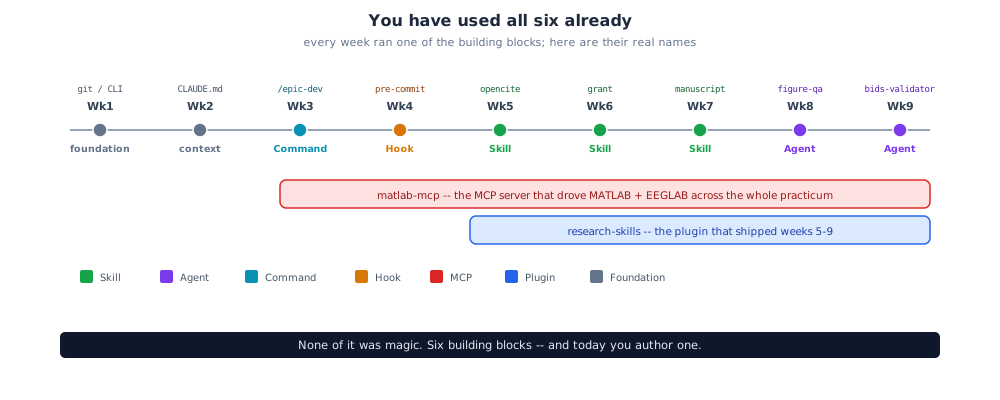
None of it was magic. The names were just never said out loud. This week says them.
2. Two Questions That Sort All Six
Researchers stay confused about skill versus agent versus MCP long after a course ends, because the words get used interchangeably and are not interchangeable. You do not need six definitions. You need two questions.
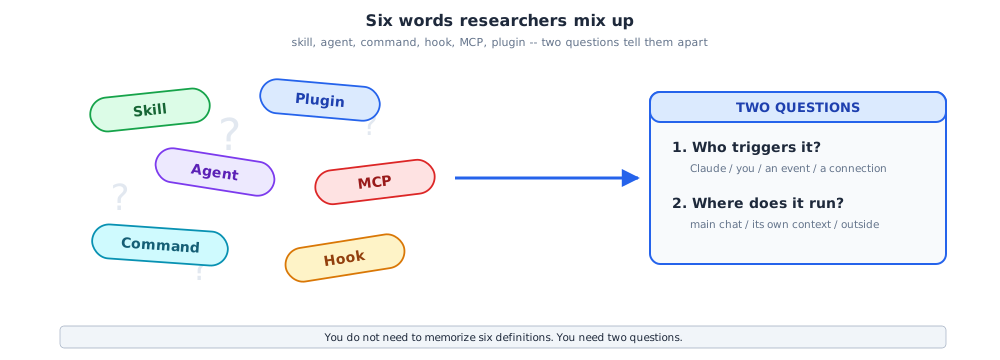
- Who triggers it? Claude, from intent (a skill or an agent); you, explicitly (a command); an event (a hook); an always-on connection (an MCP server).
- Where does it run? The main conversation (a skill); its own context window (an agent); outside the model entirely (a hook or an MCP server).
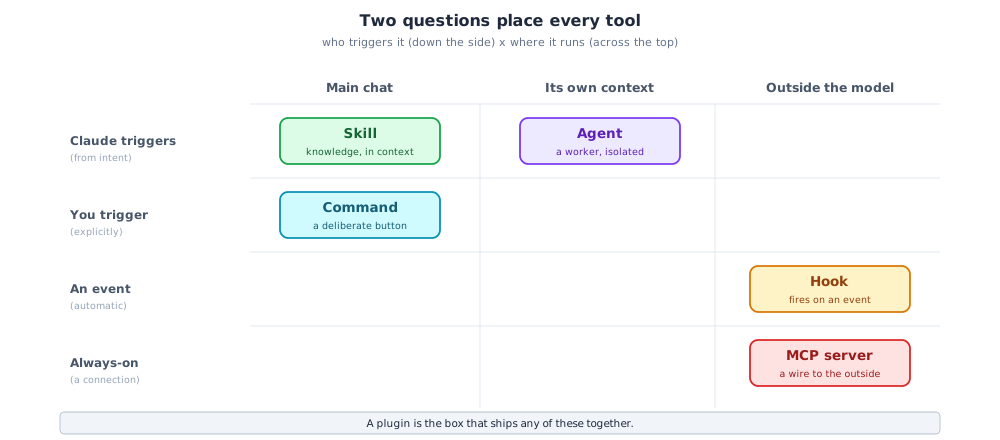
That framework produces a decision table worth screenshotting.
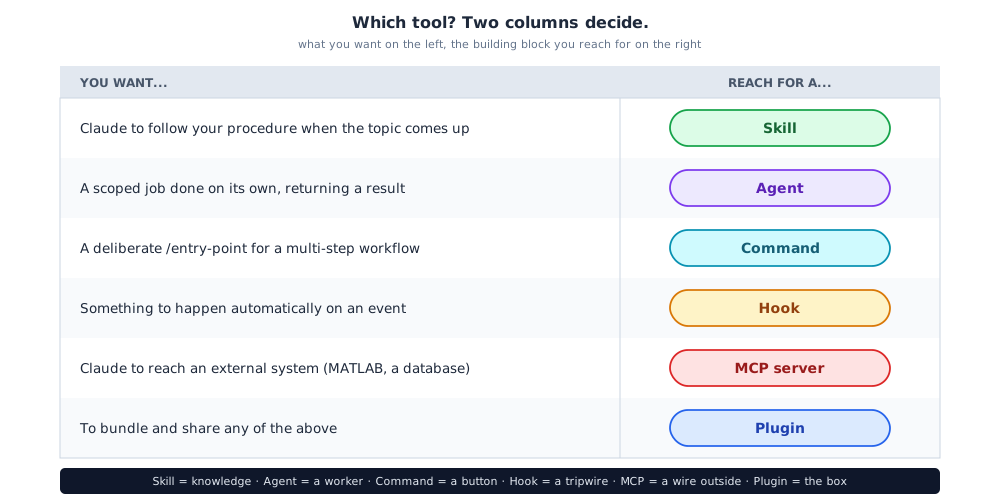
One line to remember it by
Skill = knowledge. Agent = a worker. Command = a button. Hook = a tripwire. MCP = a wire to the outside. Plugin = the box.
3. Skill vs Agent: the Confusion Worth Clearing
Both are triggered by Claude from intent, so they get mixed up. The difference is where the work happens. A skill loads knowledge into the main conversation. An agent is a separate worker with its own context, its own tools, and a model choice; you hand it a scoped job and it returns a result, and several can run in parallel.
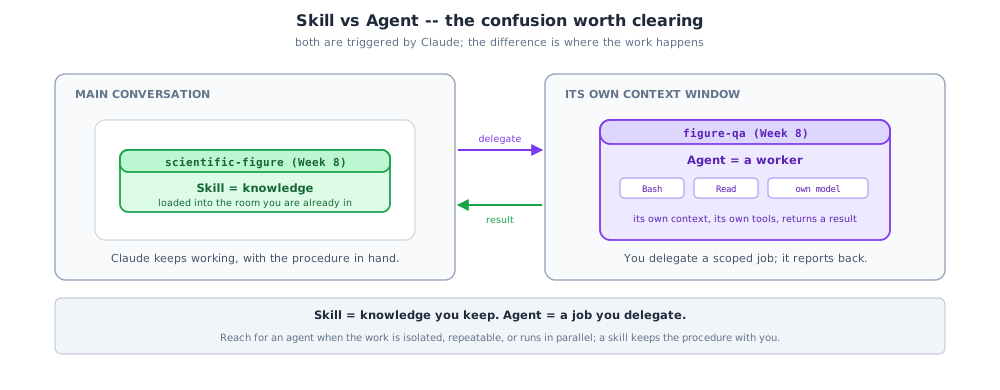
From this course: scientific-figure is a skill you use directly; figure-qa is an agent you hand a figure to and it reports back. Reach for an agent when the work is isolated, repeatable, or parallel; a skill keeps the procedure in the room with you.
4. Skill vs MCP: Knowledge vs a Wire
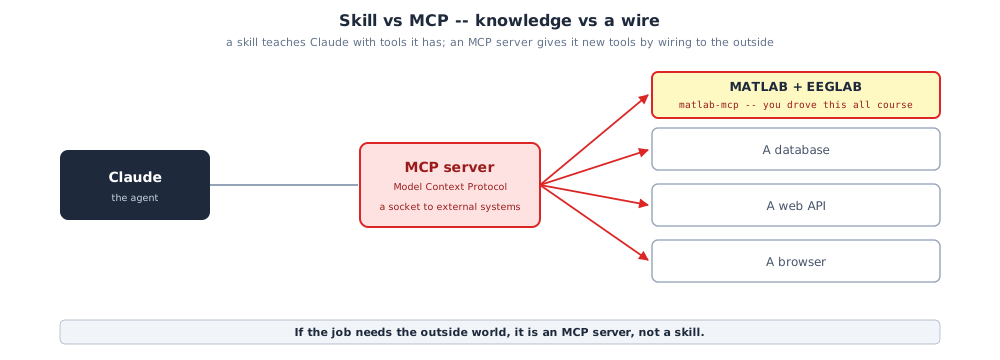
A skill teaches Claude how to do something with tools it already has. An MCP server gives Claude new tools by wiring it to an external system. You used one all course: matlab-mcp is what let Claude drive MATLAB and EEGLAB.
The test
If the job needs the outside world (a program, a database, an application programming interface, a browser), it is an MCP server, not a skill.
5. The Plugin Is the Box; the Marketplace Is the Shelf
A plugin is the only one of the six that is a container, not a capability. A single plugin.json bundles skills/, agents/, commands/, and hooks/ (and optionally an MCP server config). A marketplace lists plugins for install.
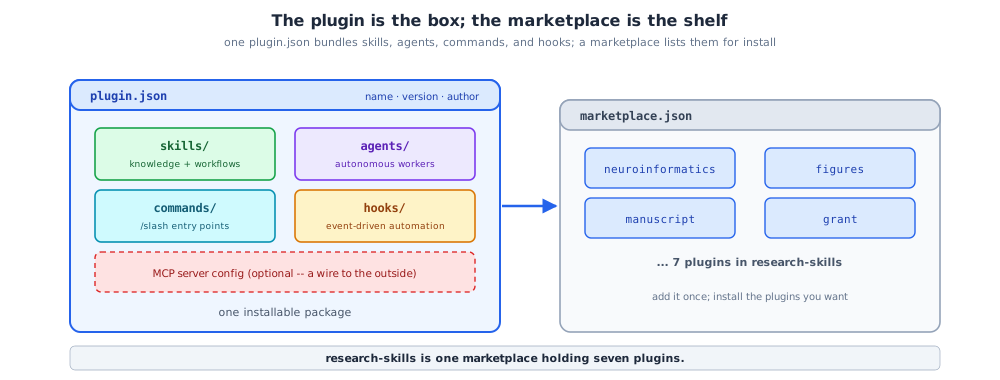
research-skills is one marketplace holding seven plugins: project, grant, manuscript, opencite, figures, presentation, and neuroinformatics.
6. What a Skill Actually Is
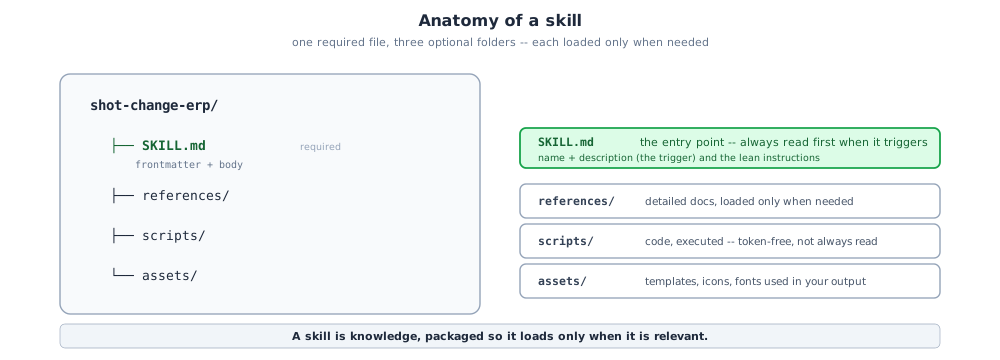
A skill is an onboarding guide for a domain. It turns general Claude into a specialist by handing over procedural knowledge no model fully has: a required SKILL.md plus optional folders.
7. Progressive Disclosure: Why Skills Stay Cheap
Skills load in three levels, in order, so you only pay for what you use.
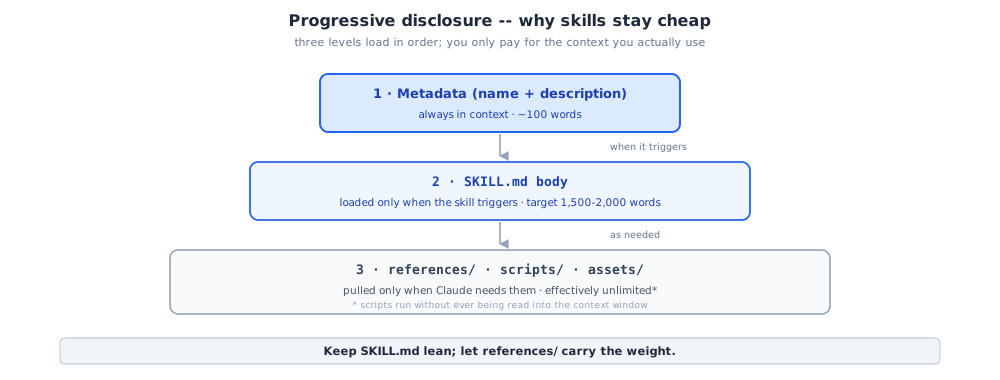
- Metadata (name + description) -- always in context, about 100 words.
- The
SKILL.mdbody -- loaded only when the skill triggers; target 1,500 to 2,000 words. - Bundled resources -- pulled only when needed; a script can run without ever being read into context.
The practical rule: keep SKILL.md lean, and let references/ carry the weight.
8. The Trigger Description Decides Everything
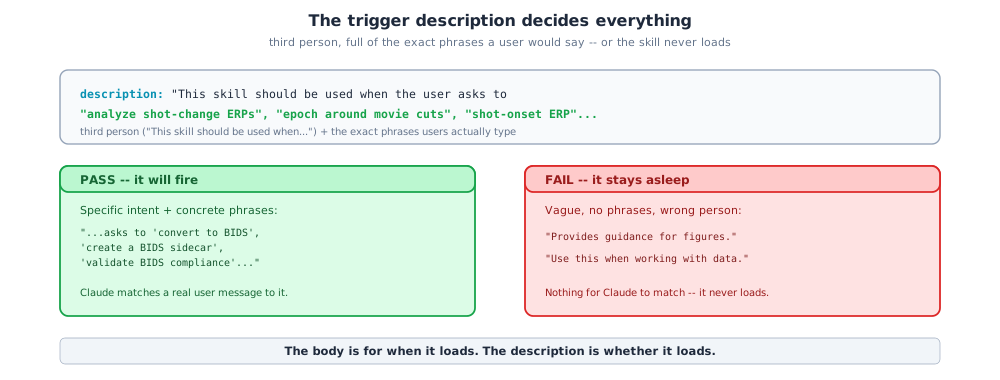
The frontmatter description decides whether Claude ever loads the skill. It must be third person and full of the exact phrases a user would say. A perfect skill with a vague description never fires.
---
name: shot-change-erp
description: This skill should be used when the user asks to "analyze shot-change ERPs",
  "epoch around movie cuts", "shot-onset ERP", or to compute event-related potentials
  around movie shot changes in EEG data.
---
The body is for when it loads. The description is whether it loads.
9. Write for the Next Claude, in Imperative Form
A skill is onboarding for a future agent, not documentation for a human reader.
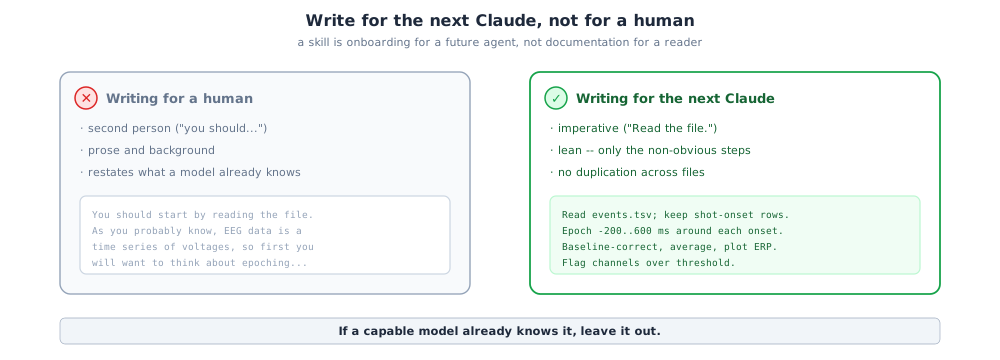
- Imperative voice. "Read
events.tsv," not "You should read the file." - Lean. Only the non-obvious steps; no duplication across files.
- Leave out what a model already knows.
10. Building with /skill-development
You do not author a skill from a blank file. You run /skill-development, which is itself a skill (it ships in the official plugin-dev plugin).
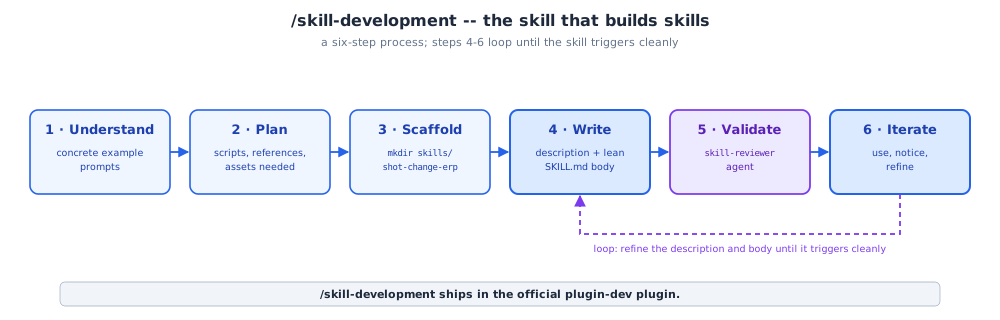
Steps 4 through 6 are the loop you actually live in.
11. Test It: Does It Trigger?
The first test is not "does the body read well," it is "does the skill load when it should." The test has two sides, and both are passing: the right prompt fires it, and the wrong prompt does not.
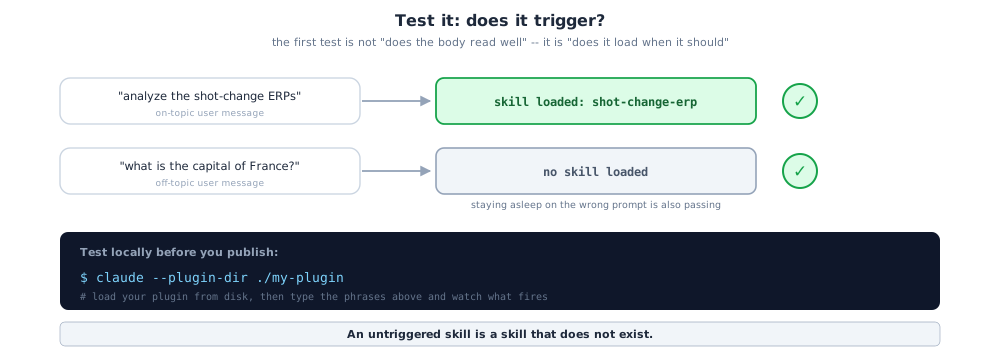
Test locally before publishing by loading the plugin from disk:
An untriggered skill is a skill that does not exist.
12. Review and Iterate
The skill-reviewer agent checks the mechanical things: is the description specific, is the body lean, is detail moved to references/, is the writing imperative, are the examples complete. Then comes the real loop: use, notice the struggle, revise.
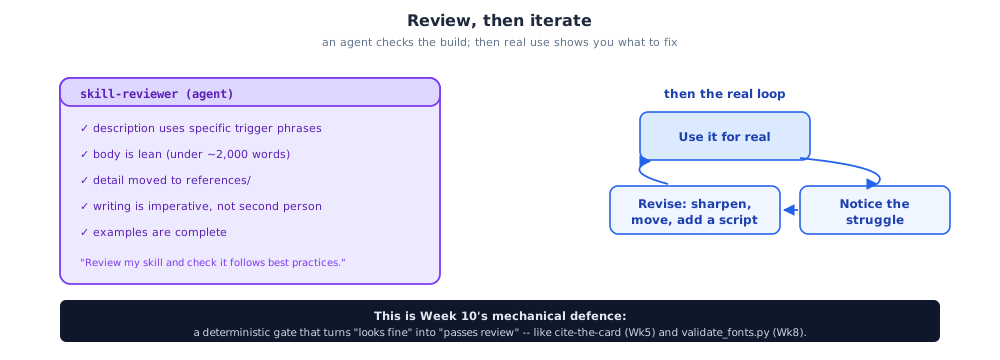
This is Week 10's mechanical defence, the same idea as cite-the-card (Week 5) and validate_fonts.py (Week 8): a deterministic gate that turns "looks fine" into "passes review."
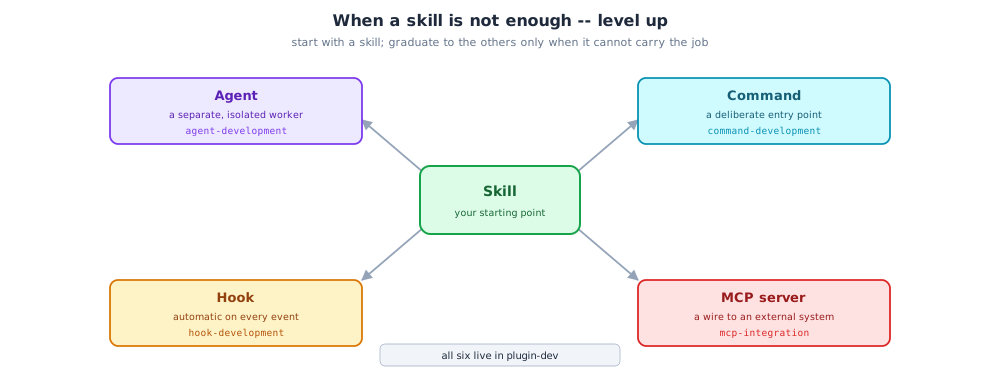
13. When a Skill Is Not Enough: Level Up
A skill is the starting point, not the ceiling. When it cannot carry the job, the other five building blocks each have a plugin-dev skill to guide you.
14. Fork research-skills
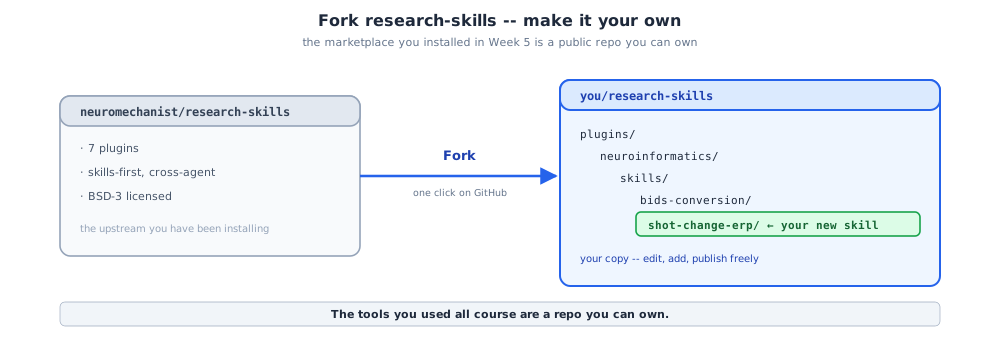
The marketplace you installed back in Week 5 is a public GitHub repository. Fork it and it is yours: plugins/*, a top-level marketplace.json, and an AGENTS.md plus CLAUDE.md pair.
15. Add Your Skill, Install It Back
Drop the skill folder into a plugin's skills/, bump the version, then add and install.
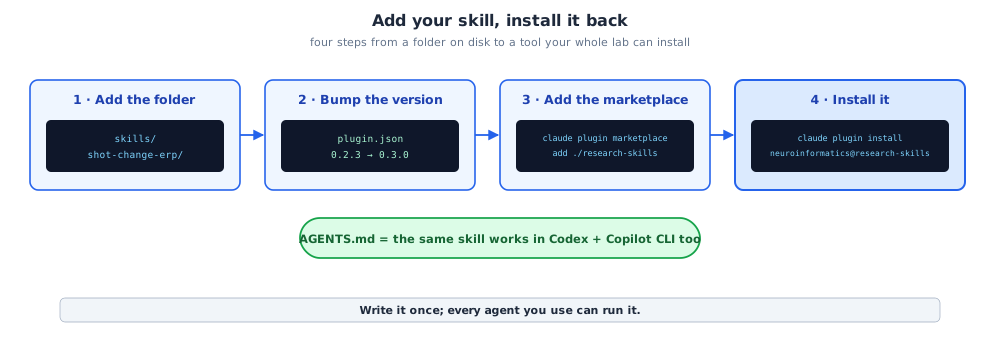
claude plugin marketplace add ./research-skills
claude plugin install neuroinformatics@research-skills
Because instructions live in AGENTS.md, the same skill also works in Codex and GitHub Copilot CLI, cross-agent for free.
16. Version and Share
Each plugin is versioned independently with semantic versioning.
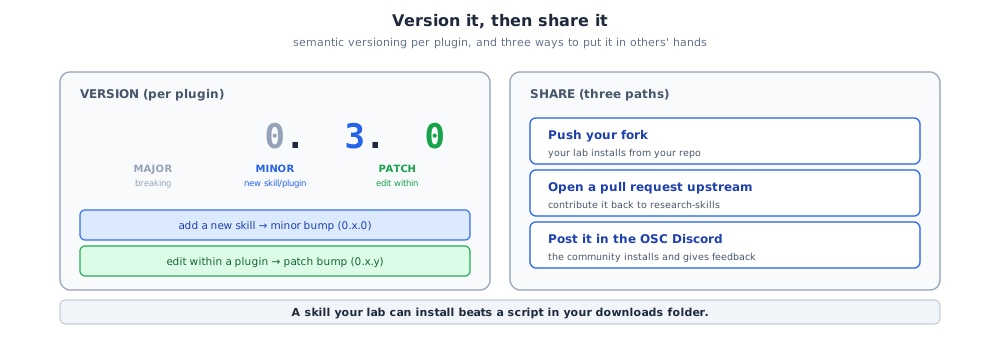
- Adding a new plugin or skill -> a minor bump (
0.x.0). - Editing within an existing plugin -> a patch bump (
0.x.y).
A skill your lab can install beats a script in your downloads folder.
17. Before You Build, and When Not To
A whole session about building deserves an honest counterweight: do not over-build.
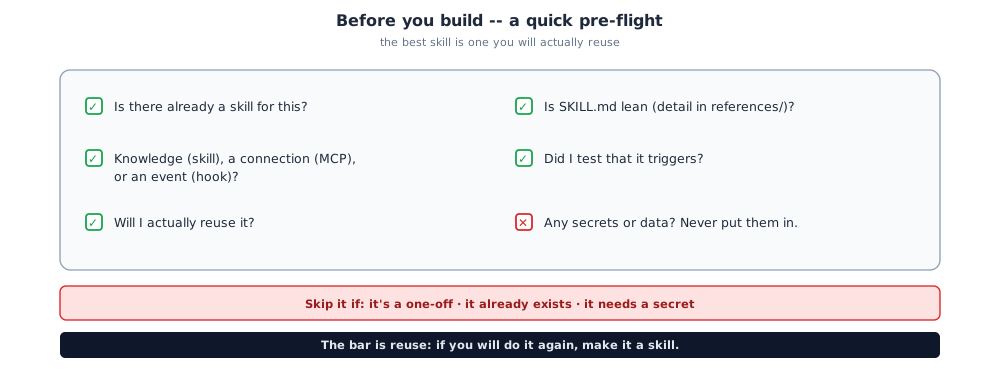
Never put secrets or data in a skill
A skill is shared knowledge, not a vault. The bar is reuse: if you will do it again, make it a skill; a genuine one-off does not need to be one.
18. Live Walkthrough
One thing, done well, about four minutes: build shot-change-erp with /skill-development, then prove it triggers.
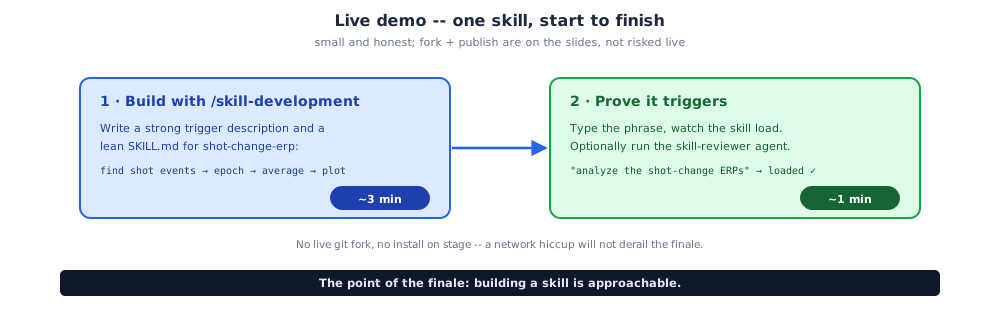
No live fork and no install on stage. The point of the finale is not a speed-run of a whole plugin; it is that building a skill is approachable.
The Course in One Breath
From git init in Week 1 to a published skill in Week 10. You used all six building blocks; this week you built one; the HBN shot-change analysis you have grown since Week 3 is now a reusable skill anyone can install.
What is next:
- Build a skill for the chore you redo most.
- Fork
research-skills, add your skill, and install it back so your whole lab gets it. - Contribute it upstream with a pull request, or post it in the Open Science Collective Discord.
- Help the next cohort. You now know the whole pipeline.
You arrived a tool user. You leave a tool builder. Thank you for ten weeks.
Resources
Course materials
- Week 10 session
- Week 10 blog (markdown source)
- Course repository
- research-skills marketplace (the seven plugins you fork and extend)
Building your own
- Claude Code (plugins, skills, agents, hooks, MCP servers)
- Model Context Protocol (the MCP standard)
- matlab-mcp-tools (the MCP server used in the practicum)
Reference