Week 8: Scientific Figures
Overview
A publication figure is not a single prompt; it is a managed 5-step pipeline (Plan, Build, Compose, Validate, Export) that lives in the same repository as the manuscript and survives journal-submission scrutiny because every step has a mechanical defence. The single most useful idea this week: validate_fonts.py is to figures what cite-the-card is to prose -- a deterministic check that converts a vague "the figure looks small" complaint into a precise "Frequency (Hz) is 4.5 pt, Nature requires >= 5 pt" finding. The figures plugin expanded from 3 skills into 5 skills plus a figure-qa agent between Weeks 7 and 8; the new shape is a deliberate response to the react-pdf workflow's structural failures.
The pipeline shape is the same as Weeks 5-7. What is new this week is the physical-size discipline (panels placed at exact mm coordinates), the font validator (effective-pt vs journal minimum across the transform stack), and the VLM-judgment QA pass (the figure-qa agent's aesthetic-correctness check, kept separate from the deterministic checks).
Learning Objectives
- Frame a publication figure as a 5-step pipeline: Plan, Build, Compose, Validate, Export
- Pick the right journal first and reuse a colour-blind-safe palette across all panels
- Use
/figures:plot-styling,/figures:svg-figure,/figures:transparent-icons, and/figures:ai-full-figureto build per-panel SVGs that preserve text for the validator - Use
/figures:scientific-figureto compose panels at exact mm coordinates with svgutils - Recognise the font-validator (
validate_fonts.py) as the new mechanical defence introduced this week - Use
/figures:figure-qato run deterministic checks (hex codes, pt sizes, bbox, alpha, arrow tips) plus a vision-language model (VLM) aesthetic pass - Pick Inkscape (preferred) or cairosvg (fallback) for the final PDF export
- Recognise the three mechanical defences (palette consistency, font validation, VLM aesthetic pass) and why they are deliberately stack-redundant
Slides
Guide
The rest of this page walks through the workflow in the order the live session follows.
1. Why the Old Workflow Broke
The previous workflow leaned on react-pdf for multi-panel composition. It had two structural failures.
First, composition did not respect physical size. Flexbox layout shifted dimensions in subtle ways during render. Over a 2-column figure, panels could drift by fractions of a millimetre and panel labels (A, B, C) would land in subtly different positions. The journal-submitted PDF and the laptop preview no longer matched.
Second, fonts shrank below readable thresholds. When a panel's content overflowed its allotted box, the engine scaled the entire figure uniformly. Axis labels that started at 7 pt landed at 4-4.5 pt, below Nature's 5 pt minimum and below Science / Cell / PNAS's 6 pt minimum. The figure was rejected at submission.
Journal-reject territory
The 5-step pipeline introduced this week is the deliberate response. Every step has a mechanical defence; the new one in Step 4 is the font validator.
2. The 5-Step scientific-figure Pipeline
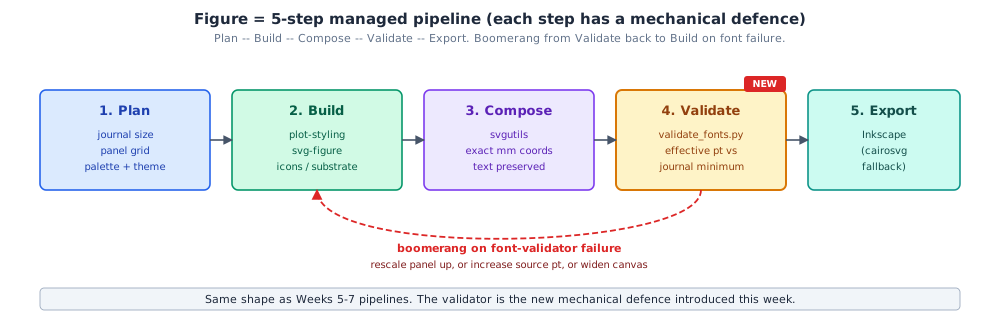
Five steps, enforced order. Composing before planning produces dimension drift; exporting before validating produces journal rejections.
| Step | Tool | Output |
|---|---|---|
| 1. Plan | /figures:scientific-figure (pick journal + palette) | Target dimensions in mm; colour-blind safe palette |
| 2. Build | /figures:plot-styling, /figures:svg-figure, /figures:transparent-icons, /figures:ai-full-figure | Per-panel SVG files with text preserved as <text> |
| 3. Compose | /figures:scientific-figure (svgutils helper) | Multi-panel SVG at exact mm coordinates; panel labels added |
| 4. Validate | validate_fonts.py | JSON report of every <text> effective pt vs the journal minimum |
| 5. Export | export.py (Inkscape or cairosvg) | Journal-ready PDF with fonts subsetted and text preserved |
3. Step 1: Pick the Journal First
Width sets the canvas. Min body font is the validator's threshold. Pick early so the validator can warn early.
| Journal | 1 column | 2 column | Min body font | Notes |
|---|---|---|---|---|
| Nature | 89 mm | 183 mm | 5 pt | 8 pt for panel labels |
| Science | 55 mm | 120 mm | 6 pt | Myriad / Helvetica preferred |
| Cell | 85 or 112 mm | 174 mm | 6 pt | Max 225 mm tall |
| PNAS | 87 mm | 180 mm | 6 pt | No label below 2 mm tall |
Full table in references/journal-specs.md
~20 journals supported out of the box: eLife, IEEE, NeuroImage, Cerebral Cortex, Journal of Neuroscience, PLOS, Cell Reports, Journal of Open Source Software (JOSS), and more.
4. Colour-blind-safe Palettes
Reuse one palette across all panels. A theme.json keeps every icon, plot, and substrate in the same colour and stroke language. The plugin ships five categorical and sequential options:
- Wong (8 swatches, categorical)
- Okabe-Ito (8 swatches, categorical, lab-calibrated)
- Tol bright (7 swatches, categorical, SciencePlots "bright" style)
- viridis (sequential, perceptually uniform)
- Crameri batlow (sequential, designed for scientific geoscience data)
This is the first of three mechanical defences, carried in from prior weeks (cite-the-card extended to cite-the-figure).
5. The figures Plugin: 5 Skills + 1 Agent
The plugin shape has changed since Week 7. The composer is the sink; four element-builder skills feed it; the QA agent runs on every figure.
/figures:scientific-figure-- the svgutils-based composer (Step 3)/figures:plot-styling-- matplotlib / seaborn / plotnine / plotly with SciencePlots defaults/figures:svg-figure-- hand-authored or programmatic schematics/figures:transparent-icons-- flat scientific icons via gpt-image-2 (Codex CLI or API)/figures:ai-full-figure-- pictorial substrates with programmatic overlay/figures:figure-qa-- the QA agent (deterministic + VLM)
6. /figures:plot-styling -- SciencePlots and SVG-with-text
For data plots: matplotlib for control, seaborn for stats, plotnine for ggplot-in-Python, plotly for HTML supplements. SciencePlots styles fix 80% of the "ugly defaults" complaints:
import matplotlib.pyplot as plt
import scienceplots  # registers SciencePlots styles

plt.style.use(["science", "nature", "no-latex"])

fig, ax = plt.subplots(figsize=(3.5, 2.5))  # 89 mm x ~63 mm
ax.plot(t, y, label="signal")
ax.set_xlabel("time (s)")
ax.set_ylabel("amplitude")
fig.savefig("panel_a.svg", transparent=True, bbox_inches="tight")
Export discipline
Save as SVG, transparent, tight bbox, embedded text. The validator inspects every <text> element; rasterised PNG breaks the check. no-latex is non-optional unless you have system LaTeX installed AND want path-rendered text (which also breaks the validator).
7. /figures:svg-figure -- Schematics with Element-Consistency Guarantees
For schematics (boxes, arrows, labels). Hand-authored SVG or programmatic via svgutils. Three constraints the skill enforces and figure-qa later checks:
- Text inside box bounds.
text-anchor="middle",dominant-baseline="middle", centred at the box's centroid. - Arrows ending at target edge.
marker-end="url(#arrow)"withrefXnear the marker tip; the visual tip lands exactly at the target shape's edge. - Lines pass under shapes by document order. Draw the connection first, then the shape that should sit on top -- no
z-indexoutside CSS-rendered SVG.
The viewBox convention: width="89mm" height="60mm" viewBox="0 0 89 60". User units equal mm. A <text font-size="9"> is 9 pt; a <rect width="20"> is 20 mm wide.
8. /figures:transparent-icons -- Codex CLI First, OpenAI API Fallback
For flat scientific icons. Two backends, auto-selected:
- Codex CLI
image_gentool (preferred). Uses localcodex login; noOPENAI_API_KEYneeded. Routes through gpt-image-2 internally. - OpenAI Images API (fallback). Requires
OPENAI_API_KEY.
uv run --with openai --with pillow python scripts/generate_icon.py \
    --template brain-eeg -o brain_eeg.png --transparent
Transparency is a post-process because gpt-image-2 (April 2026) does not accept background="transparent". Two methods: threshold (Pillow, fast, default) or birefnet (rembg + BiRefNet alpha-matting, opt-in, cleaner edges).
Accessibility win
Researchers with a ChatGPT subscription but no API key benefit immediately; the Codex backend skips the API-key requirement entirely.
9. /figures:ai-full-figure -- Substrate-Only Generation + Programmatic Overlay
For pictorial substrates (brain renderings, microscope setups, anatomical scenes, lab apparatus). The pattern: prompt the model for the picture with no text, no labels, no arrows; overlay the labels, arrows, and scale bars as a separate SVG layer; ship the combined SVG.
uv run --with openai --with pillow python scripts/generate_figure.py \
    "a stylized lateral view of a human brain in soft watercolour on a clean white background" \
    -o brain_substrate.png --size 1536x1024 --backend codex
Hard ceiling on AI generation
AI cannot reliably render axis numerals, equations, multi-arrow flowcharts, or more than 5 labelled elements. Labels longer than 1-2 words drift in position. If your figure needs any of these, use /figures:svg-figure or /figures:scientific-figure instead.
10. Step 3: /figures:scientific-figure -- svgutils Composer at Exact mm
The composer is built around svgutils (MIT). It places panels at exact mm coordinates and preserves every <text> element so the validator can inspect them.
{
  "width_mm": 183,
  "height_mm": 120,
  "journal": "nature",
  "panels": [
    {"id": "A", "src": "panels/spectrum.svg", "x_mm": 0,  "y_mm": 0, "scale": 0.5, "label": "A"},
    {"id": "B", "src": "panels/topomap.svg",  "x_mm": 92, "y_mm": 0, "scale": 0.5, "label": "B"}
  ]
}
Panel labels (A, B, C) at top-left of each panel in 12 pt bold sans-serif. Two recipes available: the helper (for the 80% case) and direct svgutils.compose.Figure for full control.
11. Step 4: validate_fonts.py -- the New Mechanical Defence
This is the slide trainees will quote. The validator parses every <text> and <tspan> element with a font-size, walks the accumulated transform stack to compute the effective pt at the final physical dimensions, and reports anything below the journal minimum.
{
  "svg": "figure.svg",
  "journal": "nature",
  "minimum_pt": 5.0,
  "checked_count": 47,
  "issue_count": 1,
  "issues": [{
    "text": "Frequency (Hz)",
    "specified_pt": 9.0,
    "effective_pt": 4.5,
    "scale_x": 0.5,
    "minimum_pt": 5.0
  }]
}
A 9 pt source label scaled to 0.5 lands at 4.5 pt effective -- under Nature's 5 pt minimum. Caught before export.
Three remedies, in priority order
- Rescale the offending panel up (and the others down) instead of accepting small text.
- Increase the source plot's font size so even at panel scale 0.5 it still passes.
- Upgrade to a wider canvas (1-column to 1.5-column, or to 2-column).
Exit codes: 0 clean, 1 issues found, 2 script error.
12. Step 5: Export (Inkscape Preferred, cairosvg Fallback)
export.py auto-detects Inkscape on $PATH at runtime. When present, Inkscape produces the highest-fidelity PDF: text remains text (selectable, searchable in the PDF), fonts subsetted and fully embedded. When absent, the script falls back to cairosvg with a stderr warning; text without an installed font may be converted to paths.
13. /figures:figure-qa -- Dispatch by Input Type
The QA agent dispatches on input type and runs the right deterministic-check script, then adds a vision-language model (VLM) aesthetic pass on top.
| Input type | Deterministic check | What it owns |
|---|---|---|
| SVG | check_svg.py | bbox overlap, arrow-tip-to-target distance, pt sizes, palette membership |
| Raster (PNG / JPG / TIFF) | check_raster.py | DPI, font embedding, alpha values, image dimensions |
| Plot script (Python source) | check_plot_script.py | savefig kwargs, rcParams font sizes, SciencePlots usage |
| Composed figure directory | All three, plus VLM | Cross-panel consistency |
The agent honours a no-qa opt-out for fast iteration; re-enable it before commit.
14. Deterministic Checks vs VLM Judgment
The strict separation is the design discipline of the QA agent.
Programmatic checks own anything with ground truth:
- A hex code is exactly equal to
"#0072B2" - A pt size is greater than or equal to 5.0
- A bbox overlap is exactly 0 (no panels collide)
- An alpha value is exactly 1.0 (no transparency)
- An arrow tip is within 0.5 mm of its target's edge
The VLM owns judgment:
- Does the hierarchy read top-down, panel A first?
- Does the background sit behind the data?
- Are the panel labels positioned consistently?
- Is whitespace distributed evenly?
- Do panels flow in argumentative order?
Never blur the line
The moment a VLM tries to judge an exact hex code, the QA loses its falsifiability.
15. Three Defences -- One per Phase
The pipeline's mechanical defences are deliberately stack-redundant. None alone is sufficient.
- Palette and theme consistency (Build phase). A
theme.jsonkeeps icons, plots, and substrates in the same colour language. Carried from prior weeks. - Font validation (Validate phase).
validate_fonts.pywalks the transform stack and reports any text below the journal minimum. New this week. - VLM aesthetic pass (QA phase).
figure-qaruns deterministic checks for everything with ground truth, then asks a vision-language model for aesthetic judgment. Evolved from Week 6'sgrant-figure-qa.
A figure that "passes" without the validator running, or without the QA agent's aesthetic pass, is hiding what it found.
16. Live Walkthrough
The Week 8 session ends with a live walkthrough composing the algorithm figure for the practicum's animacy-of-opening-shot event-related spectral perturbation (ERSP) analysis -- the methods overview figure the practicum's eventual manuscript will use as Figure 1.
Pre-built state:
- The Week-3 practicum repository with a
figures/algorithm/directory stubbed - A
theme.jsoncarrying the practicum's palette (Okabe-Ito + a custom EEG channel-strip blue) - A stub
panels-config.jsonwith two empty panels (algorithm-flow,example-ersp) - A small
example-ersp-data.csvfor the second panel
Three live actions, ~5 minutes total:
/figures:svg-figuredrafts the algorithm-flow panel (1:30). A 5-stage horizontal flow: Brain Imaging Data Structure (BIDS) load to adaptive mixture independent component analysis (AMICA) to independent component classification (IClabel) to shot-aligned epoching to ERSP to cluster-level statistics. The skill enforces text-anchored-to-box-bounds and arrows-touching-target-edges./figures:plot-stylingbuilds an example-ERSP panel (1:30). Fromexample-ersp-data.csv, draws a single-channel ERSP heat map in the Nature column style (3.5 inches wide, 7 pt axis labels).plt.style.use(['science', 'nature'])andsavefig(..., transparent=True, bbox_inches='tight')./figures:scientific-figurecomposes andfigure-qavalidates (2:00). Composes the two SVG panels into a 1-column Nature figure at 89 mm width withAandBlabels; runsvalidate_fonts.py; runs thefigure-qaagent's SVG branch including the VLM aesthetic pass.
We do not manufacture a finding
If the validator flags a font, we walk the remedy on stage -- rescale the offending panel up.
17. Before Next Week
- Install
research-skillsif not already installed; it bundlesfigures,manuscript,opencite,grant,neuroinformatics,project, andpresentation. - Run
codex loginif you have a ChatGPT subscription; the icon and substrate generators will auto-select Codex and skip the API key requirement. Otherwise setOPENAI_API_KEY. - Pick a target journal from
references/journal-specs.mdand a palette fromreferences/color-palettes.md. Write both into atheme.jsonat the root of your manuscript. - Optional:
brew install inkscapefor the highest-fidelity export. - Bring an existing figure draft (any format) if you have one; the Week 8 office hours pass it through
figure-qain real time.
Week 9 starts where Week 8 left off: BIDS, Hierarchical Event Descriptors (HED), and what the Methods section cites.
Resources
Course materials
- Week 8 session
- Week 8 blog (markdown source)
- Course repository
- research-skills plugin (bundles
figures,manuscript,opencite,grant,neuroinformatics,project,presentation)
External references
- SciencePlots (matplotlib style sheets for journal figures)
- svgutils (the MIT-licensed composer the plugin wraps)
- Inkscape (highest-fidelity SVG to PDF export)
- cairosvg (fallback exporter, no install required)
- Paul Tol notes on colour schemes (palette source)
- Bang Wong, Nature Methods 8, 441 (2011) (Wong palette source)
- Crameri scientific colour maps (geoscience-designed sequential palettes)
- Open Science Collective Discord